
Why Is My Website Not Showing on Google? How to Check and Fix It

Your new website is live. You search for your business name on Google and it is not there. Or a page you published weeks ago still does not show up, while an older page does. It is one of the first questions new clients ask us.
There are two separate problems hiding behind "not showing on Google". Either Google has not indexed the page yet, so it cannot appear for any search, or the page is indexed but does not rank for the words you typed. This guide shows how to tell which one you have and what to do about each, with screenshots from our own Google Search Console.
Key takeaways
- First find out whether the page is indexed. Google Search Console's URL Inspection tool tells you for certain.
- The most common reason a WordPress site is invisible is one ticked box: "Discourage search engines from indexing this site".
- New sites and pages can take days to a few weeks to be indexed. A sitemap and links from your other pages speed it up.
- "Not indexed" in Search Console is often normal. Redirects and duplicates are meant to be left out.
- Being indexed is not ranking. Search your exact business name first, then work on the searches customers actually use.
In this post
The 30-second check
Go to Google and search for site:yourdomain.com (your own domain, no spaces, no https). Google lists pages it has indexed from your site.
- No results at all: Google has not indexed the site. Start with the next section.
- Some pages, but not the one you want: that page has a specific problem, or Google has not got to it yet. Skip to Search Console.
- Your pages are listed: you are indexed, so this is a ranking question. Go to indexed but not showing up.
The site: search is a rough guide, not a complete list. For a definite answer about one page, use Search Console, below.
Check WordPress is not hiding your site
WordPress has a setting that asks search engines to stay away. Developers often tick it while a site is being built, then forget to untick it at launch. In the dashboard, go to Settings › Reading and look at the bottom:
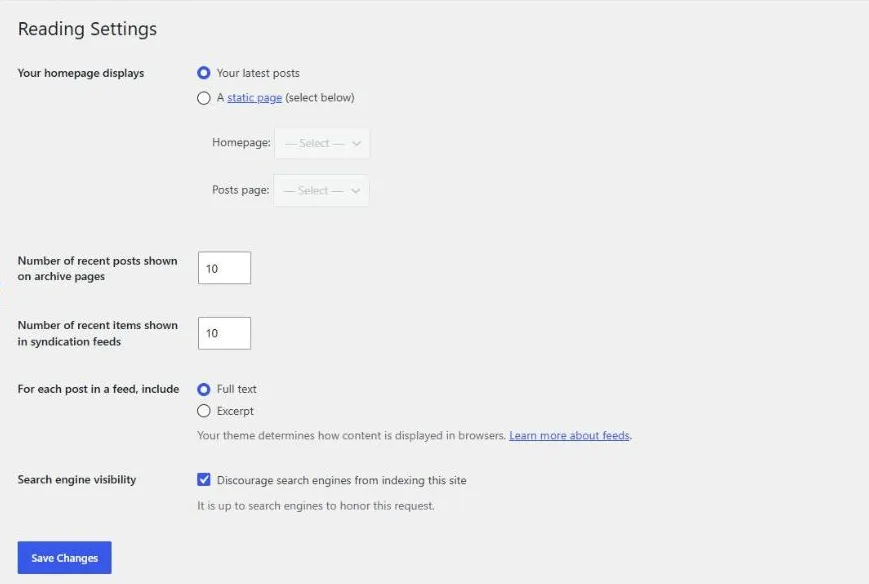
When it is ticked, WordPress adds a "noindex" instruction to every page, and Google respects it. Untick it, click Save Changes, then follow the Search Console steps below so Google comes back sooner.
Two similar switches to check while you are there:
- SEO plugins such as Yoast or Rank Math can set individual pages or whole post types to noindex. Check the SEO settings in the page editor.
- Maintenance or "coming soon" mode plugins hide the site from visitors and from Google. Make sure it is switched off.
Ask Google directly with Search Console
Google Search Console is free, and it is the only place where Google tells you exactly what it thinks of your pages. If you have not set it up yet:
- Add your site as a property and verify that you own it. Your SEO plugin or your host can usually do the verification for you.
- Submit your sitemap under Indexing › Sitemaps. On WordPress it is usually
/sitemap_index.xmlif you use Yoast or Rank Math, or/wp-sitemap.xmlwithout one. - Paste a page address into the "Inspect any URL" bar at the top.
Here is our own post on updating WordPress, which we published on 7 November. Three days later Google had already indexed it:
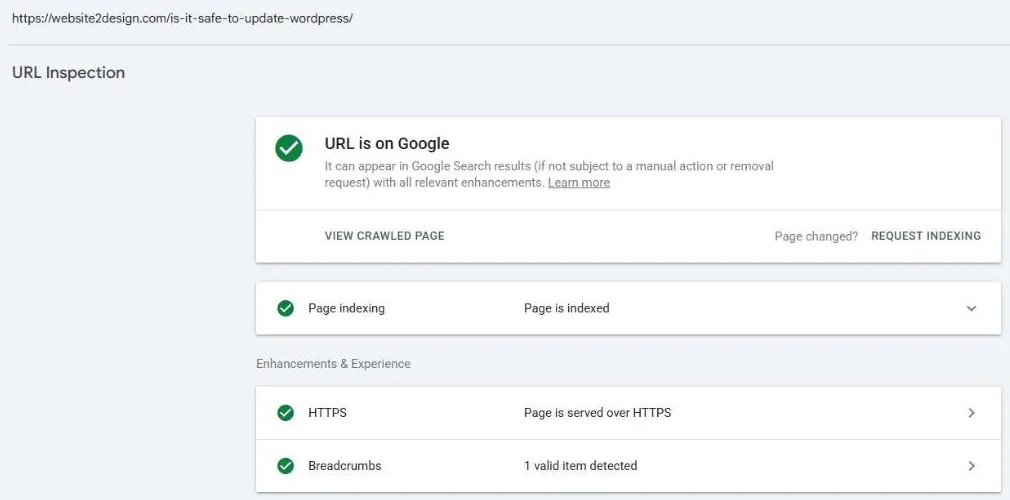
If the page is not on Google, open the Page indexing line to see the reason, fix it, then click Request indexing. That puts the page in Google's queue. Requesting it again and again does not make it faster.
Reading the "Why pages aren't indexed" report
Under Indexing › Pages, Search Console shows how many of your pages are indexed and lists the reasons the rest are not. Do not panic at the numbers. On our own site, more pages are "not indexed" than indexed, and most of that is on purpose:
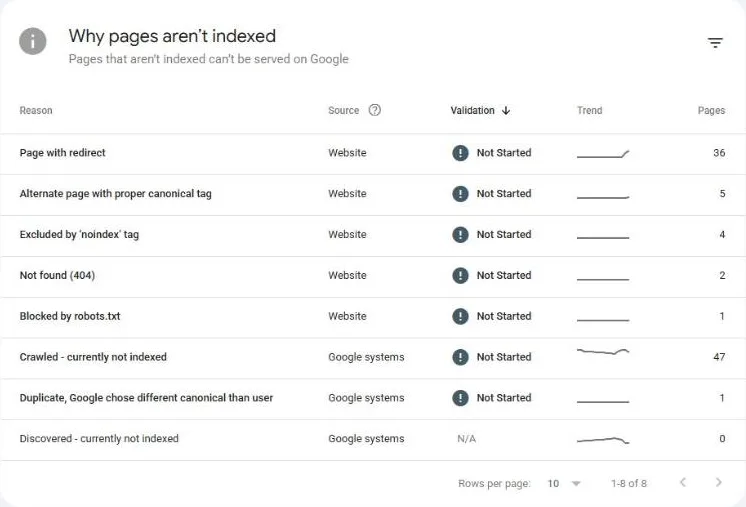
What the common reasons mean, and whether you need to act:
| Reason | What it means | Action |
|---|---|---|
| Page with redirect | The old address forwards to a new one. The new one gets indexed instead. | None, if the redirect is intended. |
| Alternate page with proper canonical tag | A duplicate version (for example with tracking codes in the address) points to the main page. | None. |
| Excluded by 'noindex' tag | The page asks not to be indexed. | Fine for thank-you or login pages. A problem if a real page is listed: check the settings above. |
| Not found (404) | The page no longer exists. | If it used to get visits, redirect it to the closest live page. |
| Blocked by robots.txt | Your robots.txt file tells Google not to crawl it. | Make sure no important page is blocked. |
| Discovered - currently not indexed | Google knows the page exists but has not visited it yet. | Link to it from your other pages and make sure it is in the sitemap. |
| Crawled - currently not indexed | Google visited and decided not to index it, for now. | Common for thin, duplicate or archive pages. For an important page, make it more useful and better linked, then request indexing. |
Click any row to see the actual addresses. What matters is that your important pages, the homepage, services, products and key posts, are in the indexed list.
Indexed but still not showing up
If URL Inspection says "URL is on Google" but you cannot find yourself, the page is indexed and the question is ranking. Some honest points:
- Search your exact business name first. A new site should come up for its own name within a few weeks of being indexed. Searches like "web designer near me" or "plumber in London" are competitive and take months of work.
- Your own results are personalised. Location and search history change what you see. The Performance report in Search Console shows the searches you actually appear for, and your average position.
- Local businesses need a Google Business Profile. For "near me" searches, the map results come from Business Profiles, not only from websites.
- Each page needs a clear topic. A page that says what you do, where, and for whom, in plain words, gives Google something to rank.
How long does it take to show on Google?
There is no fixed time. Google says crawling and indexing can take anywhere from a few days to a few weeks. In our experience:
- A new page on an established site with a sitemap and internal links is often indexed within days, like our post above.
- A brand-new site on a new domain usually takes longer, because Google has no history with it yet.
- Ranking well for competitive searches takes months, not days.
- "Discourage search engines" is unticked
- No important page is set to noindex in the SEO plugin
- Search Console is set up and the sitemap is submitted
- Important pages show "URL is on Google" in URL Inspection
- New pages are linked from the menu or from other pages
- Google Business Profile is set up, if you serve local customers
If you would rather have someone check it for you, our SEO service starts with exactly this: Search Console, a full crawl and a list of what is holding the site back. On a tight budget, we also do a one-time setup with Search Console, GA4 and a quick audit. For local businesses, add a Google Business Profile. Or just send us your site address and tell us which page is missing.
Questions we get asked
Why is my website not showing on Google when I search my business name?
Usually Google has not indexed the site yet, or the site is telling Google not to index it. On WordPress, check that "Discourage search engines from indexing this site" under Settings > Reading is unticked. Then set up Google Search Console, submit your sitemap and use URL Inspection on the homepage.
How do I get Google to index my website faster?
Submit a sitemap in Google Search Console, use URL Inspection and click Request indexing for your key pages, and link new pages from your menu or other pages. There is no paid way to get indexed faster.
Do I have to pay Google to appear in search results?
No. Organic search results are free. Paying for Google Ads puts an ad above the results, but it does not affect whether your pages are indexed or how they rank organically.
Is "Crawled - currently not indexed" bad?
Not always. Google leaves out pages it sees as thin, duplicate or low value, such as tag archives. It is only a problem when an important page, like a service page or key post, is on that list. Improve the page, link to it from other pages and request indexing again.
My website used to show on Google and has disappeared. What happened?
Common causes are a redesign or move that changed page addresses without redirects, a noindex setting switched on during the work, or a site that is down or hacked. Check URL Inspection and the Page indexing report in Search Console, and look under Security & Manual Actions for any warnings.


