
Is It Safe to Update WordPress in 2026? How We Update Without Breaking Your Site

"Is it safe to click Update?" is one of the questions we hear most from WordPress site owners. Usually it comes right after a plugin update broke a page, or right after someone noticed their site has not been updated in a year.
The short answer: yes, updating WordPress is safe, and leaving it out of date is the bigger risk. What makes an update safe is not luck. It is the order you do things in. This post explains where WordPress stands in November 2026, what actually breaks during updates, and the exact routine we follow on client sites, with screenshots.
Key takeaways
- WordPress 7.1.4 (28 October 2026) is the current release, and wordpress.org says only the latest 7.1 release is actively maintained.
- Every 7.1 point release so far has included security fixes. Skipping them leaves known holes open.
- Most update problems come from plugins, page builders and old PHP, not from WordPress core.
- Back up first, check PHP, test bigger sites on a staging copy, then update one piece at a time.
- WordPress 7.2 is planned for 8 December 2026. On business-critical sites, give it a few days before updating.
In this post
Where WordPress is right now (November 2026)
2026 has been a big year for WordPress. Version 7.0 was the first new major number in years, and two feature releases have shipped since May.
| Release | Date | What it means for site owners |
|---|---|---|
| WordPress 7.0 "Armstrong" | 20 May 2026 | A refreshed admin with a command palette (Ctrl+K), a fonts screen, visual revisions, and an AI Client in core that connects WordPress to AI services once you set it up. Minimum PHP raised to 7.4. |
| WordPress 7.1 | 19 August 2026 | Per-screen-size block styling, a new media editing window, and native AVIF and HEIC (iPhone photo) uploads. |
| WordPress 7.1.1 to 7.1.4 | 17 Sep to 28 Oct 2026 | Maintenance and security releases. 7.1.4 is the current version. |
| WordPress 7.2 | Planned 8 Dec 2026 | In beta now. The plan can still change. |
Two details matter more than the feature lists. First, the official WordPress releases page says only the latest 7.1 release is actively maintained. Second, WordPress 7.0 raised the minimum PHP version to 7.4, so a site on a very old server cannot move to 7.x at all until the server is upgraded. We cover that in our post on PHP 8.2 reaching end of life.
Why skipping updates is riskier than updating
When you finish an update, WordPress shows a summary of what changed. Here is the one from a test site we updated to 7.1.4 while writing this post. Every line mentions security.
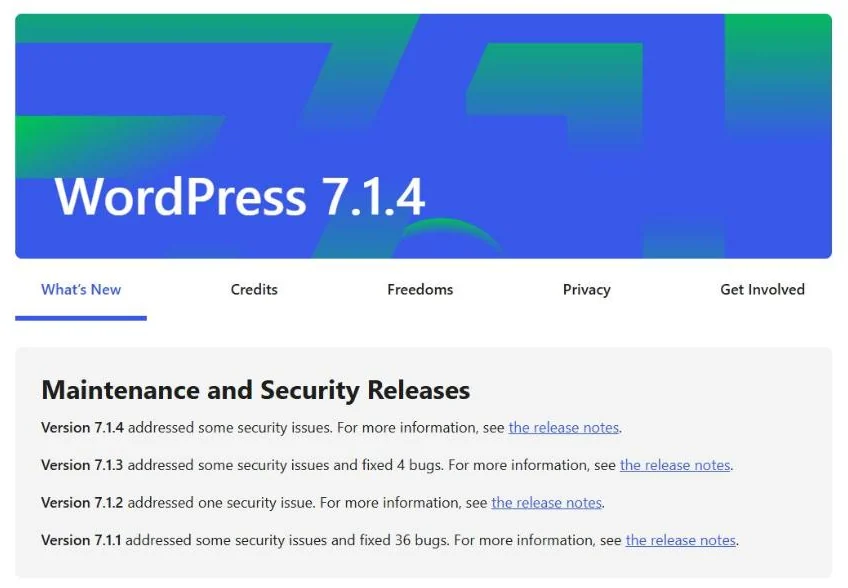
Once a security fix is public, the details of the hole are public too. Sites that stay on the old version become easy targets. Most WordPress security holes are found in plugins and themes rather than in WordPress itself, which is why updating them matters just as much. If your site is already showing strange pop-ups, read our post on the fake "Update Chrome" malware or get help from our website security team.
Not updating does not freeze your site in a safe state. Your server, your browser visitors and the plugins around WordPress keep changing. A site that has not been touched for a year usually needs more careful work, not less.
What actually breaks during an update
WordPress core updates rarely break a site on their own. When something goes wrong, it is almost always one of these:
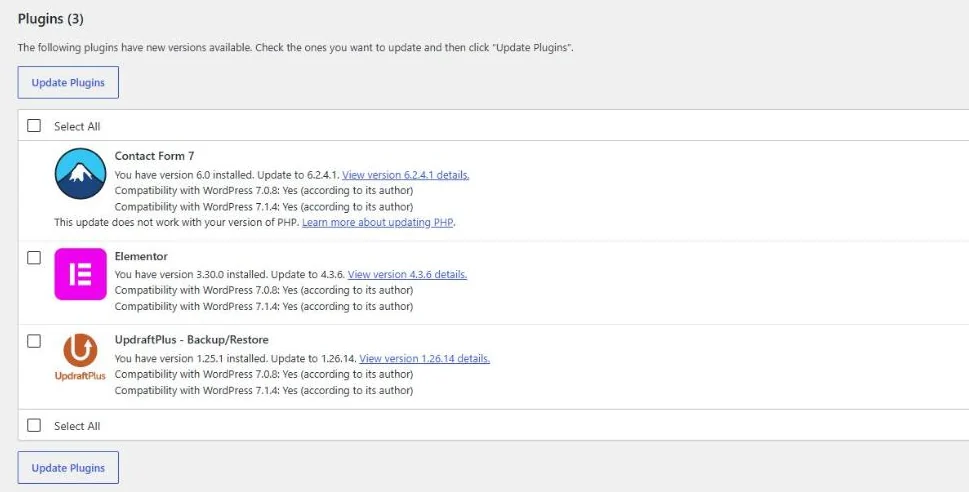
- Big jumps in a page builder. On our test site, Elementor wanted to go from 3.30 to 4.3.6. Elementor 4 brought a new "Atomic" editor in March 2026. Elementor says existing pages keep working until you switch the new editor on, but a jump that size still deserves a test first.
- Plugins that need a newer PHP version. The newest Contact Form 7 (6.2.4.1, released 29 October 2026) requires PHP 8.3 and WordPress 7.1. On a server running PHP 8.2, WordPress refuses that update.
- WooCommerce database updates. Store updates often include database changes. They are normally automatic, but they are the reason we never update a busy store without a fresh backup.
- Edits made directly in theme files. If someone changed the theme's code instead of using a child theme, a theme update overwrites those changes.
- Abandoned plugins. A plugin that has not been updated in years may simply stop working with newer WordPress or PHP.
How we update a WordPress site, step by step
This is the routine we follow on the sites we look after. You can follow the same steps on your own site.
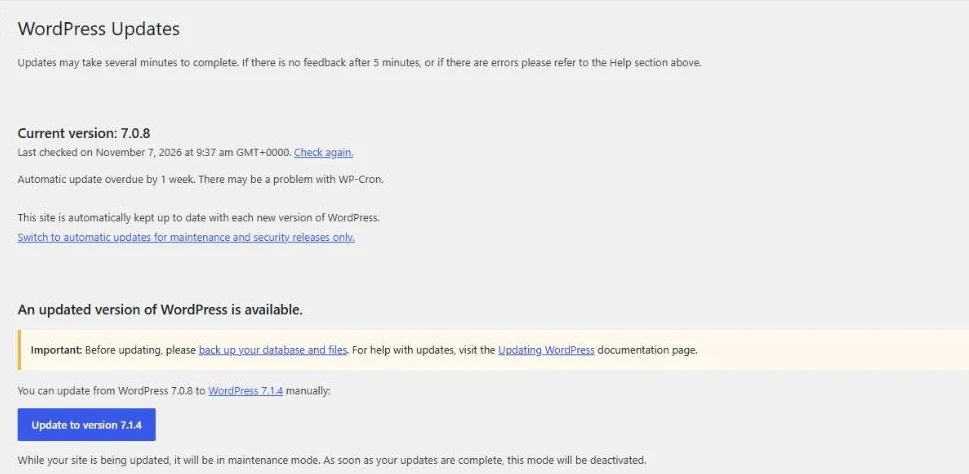
- See what is waiting. Dashboard › Updates lists the WordPress version, plugins and themes with new versions. We read the changelog for anything that is a major version jump (like Elementor 3 to 4) or anything touching checkout or forms.
- Check the PHP version. Tools › Site Health tells you which PHP version the server runs. If a plugin needs a newer one, we sort out PHP first, because the plugin update will be refused otherwise.
- Take a full backup, files and database. Before any update or edit, we make sure there is a fresh backup we can restore. If something breaks, the fix is a restore, not a rebuild. Keep a copy off the server, not only on the same hosting account.
- Use a staging copy for larger sites. For stores, membership sites and sites with lots of plugins, we update a private copy first and click through it before touching the live site.
- Update in a calm order. WordPress core first, then plugins one at a time, then the theme. One at a time means that if something breaks, we know exactly what caused it.
- Check the site properly afterwards. Home page, key service pages, the menu on mobile, a test contact form, and a test checkout on stores. Clearing the cache before checking avoids false alarms.
- Write down what changed. Our clients get a short monthly summary, and code changes are tracked in version control, so any change can be traced and rolled back.
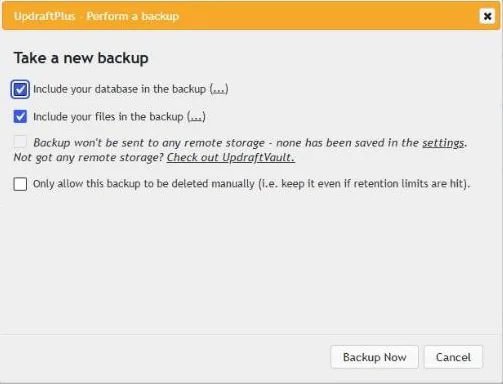
If an update does break something: do not keep clicking. Restore the backup you took a few minutes ago, then update the pieces one by one on a staging copy to find the cause. This is exactly why the backup comes first.
Should you turn on auto-updates?
Partly. Our rule of thumb:
- Keep automatic minor and security updates for WordPress core on. These are small fixes and rarely cause problems.
- Auto-update small, well-maintained plugins if you check the site regularly.
- Update page builders, WooCommerce and payment plugins by hand, with a backup, because a bad update there can take down layouts or checkout.
- Never rely on auto-updates alone. Someone should still look at the site after updates run.
If you want to learn the theme update screens in detail, our older beginner guide on how to update a WordPress theme walks through them.
WordPress 7.2 is due 8 December: what to do
The WordPress 7.2 schedule lists release candidates from 17 November and the final release on 8 December 2026. The roadmap mentions items like extra password checks for sensitive actions and new blocks, but plans can change before release.
For a simple brochure site, updating within a few days is fine. For stores and sites that bring in leads every day, we wait until the main plugins confirm support, test on staging, and then update. The first point release, which fixes early bugs, usually follows within a few weeks.
Want someone else to handle it?
Updates are the kind of job that is easy to put off until something breaks. Our website maintenance plans cover core, plugin and theme updates with a backup before every change, staging tests for larger sites, and same-day replies, starting from $10 a month (₹1,500 in India). If you host with us, monthly maintenance is included. If your site needs a new home first, we can handle the migration too. Switching from another developer? Our handover checklist covers what to collect first.
Send us your site address and we will tell you what is out of date and what it would take to bring it up to date safely.
Questions we get asked
Will updating WordPress delete my content?
No. Updates replace WordPress's own files, not your pages, posts, images or settings, which live in the database and the uploads folder. That said, always take a full backup first, because a plugin conflict can break how content is displayed even though the content itself is safe.
How often should a WordPress site be updated?
Security releases should go on within days. For everything else, a weekly or monthly routine works for most business sites, with a backup before each round. Stores and busy sites benefit from testing larger updates on a staging copy first.
Is it safe to update Elementor to version 4?
Elementor says existing pages keep working as before until you switch the new Atomic editor on. It is still a major version jump, so we take a backup and test on a staging copy for larger sites before updating the live site.
What should I do if an update breaks my site?
Stop updating and restore the backup you took before the update. Then update the pieces one at a time, ideally on a staging copy, to find which plugin or theme caused the problem. If you are locked out completely, your host can usually restore a backup for you.
Can I update WordPress if my server runs an old PHP version?
Only up to a point. WordPress 7.0 needs at least PHP 7.4, and many plugins now need PHP 8.3 or newer. On an older server, WordPress and plugins will refuse some updates until the PHP version is upgraded.


