
WordPress Contact Form Not Sending Emails? Why It Happens and How to Fix It

A visitor fills in your contact form, presses Send and sees a green "Thank you, your message has been sent." You never get the email. You find out weeks later, when a customer rings to ask why nobody replied.
This is one of the most common WordPress problems we fix, and one of the most expensive, because every lost message is a lost enquiry. The good news: the cause is nearly always the same, and the fix takes under an hour. This guide shows why it happens, with screenshots from a test site, and the setup we use on client sites so form emails actually arrive.
Key takeaways
- "Your message has been sent" only means WordPress handed the email to the server. It does not mean it arrived.
- By default WordPress sends mail through your web server, which Gmail and Outlook trust very little.
- The fix is to send through a proper mail service using an SMTP plugin such as WP Mail SMTP, FluentSMTP, Post SMTP or Zoho Mail for WordPress, and to add SPF, DKIM and DMARC records to your domain.
- On Microsoft 365, the Azure app secret expires. Put the date in your calendar or the emails stop again.
- The "From" address must be on your own domain. Put the visitor's email in Reply-To, not From.
- Save every form entry in the dashboard too, so no enquiry is lost even if an email fails.
In this post
"Sent" is not the same as delivered
We set up a fresh WordPress test site with Contact Form 7, one of the most used form plugins, and filled in the form. This test site has no working mail setup at all, so no email went anywhere. The form still reported success:
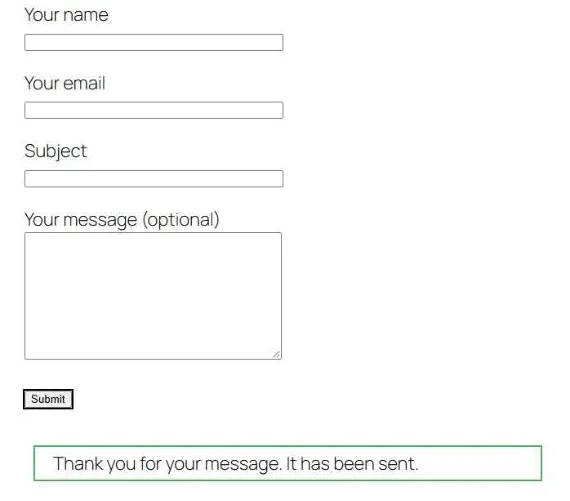
That is why this problem goes unnoticed for so long. Nothing on the website looks broken. The email is either never sent by the server, rejected by the receiving mail provider, or quietly filed in spam.
Why WordPress emails go missing
Out of the box, WordPress sends email using PHP's built-in mail function on your web server. That works, technically, but receiving providers like Gmail and Outlook see a message that:
- comes from a web server, not a mail server. On shared hosting, that server's address is shared with hundreds of other sites, some of which send spam.
- cannot prove it is allowed to send for your domain. Google's sender guidelines ask every sender to authenticate with SPF or DKIM. Plain server mail usually has neither for your domain.
- often uses a From address the server does not own. Some forms are set to send "from" the visitor's Gmail address. To Gmail, that looks exactly like a forged email.
Some hosts go further and block or limit PHP mail entirely to stop spam. In that case nothing leaves the server at all.
Quick checks before you change anything
- Check spam and every other folder of the inbox the form sends to, including Gmail's Promotions and Updates tabs.
- Check where the form sends to. In Contact Form 7, open the form and the Mail tab. Make sure the "To" address is right and still in use. Other form plugins have a similar "Notifications" setting.
- Check the From address. It should be an address on your own domain, like
website@yourdomain.com. If it is set to the visitor's email, move that to aReply-To:line in the additional headers so you can still reply with one click. - Check WordPress's own emails. Use "Lost your password?" on the login page. If that email does not arrive either, the problem is the whole site's email, not the form.
The fix: send through SMTP
SMTP means WordPress logs in to a real mail service and sends through it, instead of using the web server. The receiving side then sees a properly authenticated email from a sender it trusts. The easiest way to set it up is a free SMTP plugin. We have set up every plugin in the table below on client websites, and there is no single best one. The right pick depends mostly on which email service the client uses.
The popular SMTP plugins
| Plugin | Free version | Paid only | Best for |
|---|---|---|---|
| WP Mail SMTP | Google / Gmail, Brevo, Mailgun, Postmark, SendGrid, SMTP2GO, Other SMTP and more | Microsoft 365 / Outlook, Zoho Mail, Amazon SES, email log | Google Workspace or a sending service. The most installed, with an easy setup wizard. |
| FluentSMTP | Everything: Microsoft 365 / Outlook, Google / Gmail, Amazon SES, Brevo, Mailgun, Postmark, SendGrid, Zoho (SMTP), any SMTP server, email log, fallback connection | Nothing. There is no Pro version. | Microsoft 365, and anyone who wants every feature free. |
| Post SMTP | Google / Gmail, Brevo, Mailgun, Postmark, SendGrid, Other SMTP, email log, failure alerts | Microsoft 365 / Outlook, Zoho Mail, Amazon SES | Logs and alerts (email, Slack, mobile app) when a message fails. |
| WPO365 Microsoft 365 Graph Mailer | Sends through Microsoft 365, Outlook.com or Hotmail using Microsoft Graph, Microsoft's own API | Failure alerts, email log, auto-retry, shared mailbox, send as another user | Microsoft 365 only. Built for it and nothing else. |
| Zoho Mail for WordPress | Sends through your Zoho Mail account using Zoho's own API | Nothing | Zoho Mail users. It is the official plugin from Zoho, and sent emails show up in your Zoho Sent folder. |
| SureMail | Everything: Amazon SES, Google / Gmail, Brevo, Mailgun, Postmark, SendGrid, Other SMTP, email log, fallback connections, retries, alerts | Nothing. It is fully free. | Sending services and Google Workspace. It has no Microsoft 365 option. |
| Easy WP SMTP | SendLayer, Brevo, Mailgun, Postmark, SendGrid, SMTP2GO, Other SMTP and more | Microsoft 365 / Outlook, Google / Gmail, Zoho Mail, Amazon SES, email log, alerts, backup connection | Sending services. From the same company as WP Mail SMTP. |
| Solid Mail | SendGrid, Mailgun, Brevo, Amazon SES, Postmark, any SMTP server, email log, fallback connection | Nothing | Sending services. Made by SolidWP, the team behind Solid Security. |
| Email Deliverability (Site Mailer) | Sends through Elementor's own email service, with a 30-day email log and resend | Needs an Elementor account | Elementor users who do not want to set up a mail service at all. It does not use your own mailbox. |
So WP Mail SMTP is the best known, but its free version is one of the most limited if you are on Microsoft 365 or Zoho. For those, FluentSMTP, WPO365 or Zoho's own plugin does the job for free. If you use a sending service such as Amazon SES, FluentSMTP and SureMail include it free.
Which mailer to choose
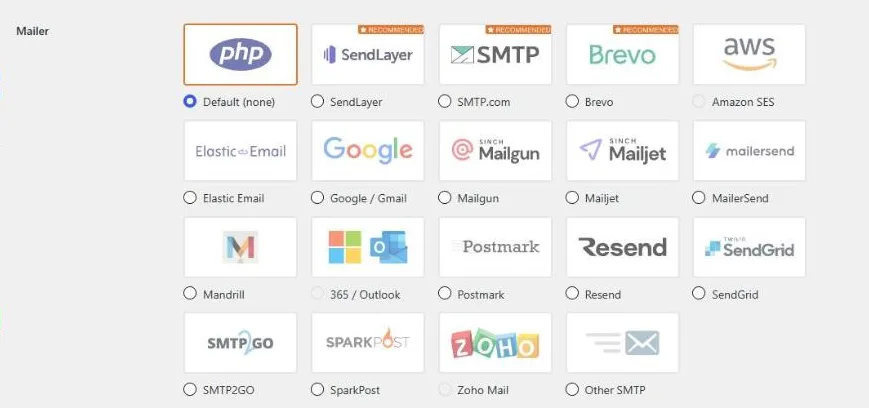
Whichever plugin you install, it asks you to pick a mailer. This is the WP Mail SMTP screen. The other plugins have a similar list:
| You use | Pick | Notes |
|---|---|---|
| Google Workspace | Google / Gmail in any of the plugins | Sends through your own Workspace account. |
| Microsoft 365 | Outlook / Microsoft 365 in FluentSMTP, or WPO365 | Free in both. Paid in WP Mail SMTP, Post SMTP and Easy WP SMTP. Needs an app registered in Microsoft Azure (see below). |
| Zoho Mail | Zoho Mail for WordPress | Free and official. FluentSMTP's Zoho SMTP connection works too. |
| Email from your host (cPanel and similar) | Other SMTP | Use the mailbox's SMTP server, port, username and password from your host. |
| A busy site or a store | Brevo, Mailgun, Postmark, SendGrid and similar | Built for sending website email. Several offer a free tier for low volumes. |
Set the From address to one on your domain, and turn on the option that forces it (WP Mail SMTP calls it Force From Email), so every plugin sends from the same trusted address. Then send a test email from the plugin's own test screen, and submit your real contact form once yourself.
Microsoft 365: put the secret's expiry date in your calendar
Microsoft has switched off the old way of sending with just an email address and password, so "Other SMTP" with your Outlook login usually fails. Instead, you register an app in the Microsoft Azure portal (Microsoft Entra ID) and paste its Client ID and Client Secret into the SMTP plugin. That secret does not last forever. Microsoft caps it at 24 months and recommends less than 12, and you choose the expiry when you create it.
When the secret expires, Microsoft stops accepting the connection, and your form emails stop with it. Nothing on the website changes. The form still says "sent". It is the same silent failure this post started with, just a year or two later.
- Note the expiry date shown next to the secret under Certificates & secrets in the Azure app.
- Add a calendar reminder two to four weeks before that date, with a second alert a few days before, for whoever looks after the website.
- Before it expires, create a new secret in the same Azure app, paste it into the SMTP plugin, send a test email, then delete the old secret.
Turn on the plugin's failure alerts too, if it has them, so a broken connection reaches you even if the reminder gets missed.
No business email yet? An address like info@yourdomain.com looks more professional to customers and gives you something proper to send from. We set up business email on Google Workspace, Microsoft 365 or Zoho Mail, with SPF, DKIM and DMARC done for you.
Add SPF, DKIM and DMARC to your domain
These are three short DNS records that tell the world which services may send email for your domain. Your mail service gives you the exact values to copy. You add them wherever your domain's DNS is managed, which is often your domain registrar or host.
- SPF lists the servers allowed to send for your domain. You can only have one SPF record, so add new services to it rather than creating a second one.
- DKIM adds a digital signature to each email that the receiver can check.
- DMARC tells receivers what to do when a message fails those checks. Starting with
p=noneis fine, it just collects reports.
Google requires SPF or DKIM from everyone sending to Gmail, and all three from bulk senders. A contact form is not bulk mail, but setting up all three is the surest way to keep form emails out of spam.
Keep a copy of every enquiry
Even a perfect setup can fail one day: an expired password, a full mailbox, a DNS change. So it is worth saving every form entry inside WordPress as well. Many form plugins do this built in. For Contact Form 7, the free Flamingo plugin from the same developer stores each submission in the dashboard.
- Form emails send through SMTP, not "Default (none)"
- On Microsoft 365, the Azure secret's expiry date is in the calendar with a reminder
- From address is on your own domain, visitor's email in Reply-To
- SPF, DKIM and DMARC records added for the domain
- Test email and a real form test both arrive in the inbox
- Every submission is also saved in the dashboard
- Somebody tests the form again after any big change to the site
Testing the forms after updates is part of our website maintenance plans, from $10 a month (₹1,500 in India). If your form has gone quiet and you want it sorted, send us your site address. It is worth a phone call too, because this form might be the one that is not reaching us.
Questions we get asked
Why does my WordPress contact form say sent but I get no email?
The form only confirms that WordPress passed the message to the server. By default WordPress sends through the web server's PHP mail, which many hosts limit and which Gmail and Outlook often reject or mark as spam. Sending through SMTP with SPF, DKIM and DMARC set up for your domain fixes it in most cases.
Which SMTP plugin should I use for Google Workspace or Gmail?
Free options: WP Mail SMTP, FluentSMTP, Post SMTP and SureMail. Easy WP SMTP charges for Gmail. Our pick isWP Mail SMTP, because its setup wizard walks you through the Google connection step by step and it is the most installed SMTP plugin, so help is easy to find. If you also want a free log of every email sent, choose FluentSMTP instead, since the email log is paid in WP Mail SMTP.
Which SMTP plugin should I use for Microsoft 365 or Outlook?
Free options: FluentSMTP and WPO365 Microsoft 365 Graph Mailer. WP Mail SMTP, Post SMTP and Easy WP SMTP charge for Microsoft 365, and SureMail and Solid Mail do not support it. Our pick isFluentSMTP, because Microsoft 365, the email log and a backup connection are all free, so you can add a second mail service that takes over if Microsoft fails. Choose WPO365 if Microsoft 365 is all you will ever use, since it is built only for it and sends through Microsoft's own Graph API. Both need an app registered in Microsoft Azure, and its secret expires, so note the date.
Which SMTP plugin should I use for Zoho Mail?
Free options: Zoho Mail for WordPress and FluentSMTP (through its Zoho SMTP connection). WP Mail SMTP, Post SMTP and Easy WP SMTP charge for their Zoho mailer. Our pick isZoho Mail for WordPress, because it is Zoho's own official plugin, it connects through Zoho's API with OAuth so your password is never stored on the website, and sent emails show up in your Zoho Sent folder. Choose FluentSMTP if you want a log of every email inside WordPress too.
Which SMTP plugin should I use for Amazon SES?
Free options: FluentSMTP, SureMail and Solid Mail. WP Mail SMTP, Post SMTP and Easy WP SMTP charge for Amazon SES. Our pick isFluentSMTP, because it connects through Amazon's own SES API in every SES region, and the email log, backup connection and routing by From address are free. SureMail is a close second, with automatic retries and failure alerts included free.
Which SMTP plugin should I use for Brevo, Mailgun, SendGrid or Postmark?
Almost every plugin supports these free: WP Mail SMTP, FluentSMTP, Post SMTP, SureMail, Easy WP SMTP and Solid Mail. Our pick isFluentSMTP or SureMail, because the email log and backup connection are free in both, while WP Mail SMTP and Easy WP SMTP charge for them. If a message fails, you can see it in the log and the backup service sends it instead.
Which SMTP plugin should I use for email from my web host (cPanel)?
Every general SMTP plugin has a free Other SMTP option for this: WP Mail SMTP, FluentSMTP, Post SMTP, SureMail, Easy WP SMTP and Solid Mail. Our pick isFluentSMTP or Post SMTP, because both log every email free and Post SMTP can alert you when one fails, which matters more here since host mail servers are trusted less than dedicated mail services. Enter the mailbox's SMTP server, port, username and password from your host.
Why did my Microsoft 365 form emails suddenly stop?
The most common reason is that the Client Secret of the Azure app the SMTP plugin uses has expired. Secrets last at most 24 months. Create a new secret in the Azure portal, paste it into the plugin, send a test, and add the new expiry date to your calendar with a reminder a few weeks before.
Can I send WordPress emails through my Gmail account?
You can, but it is better to use an address on your own domain through Google Workspace. Sending from a personal @gmail.com address on behalf of your website is limited and looks less professional to customers.
Why are form emails going to spam and not missing completely?
The receiving provider got the email but did not trust it. The usual reasons are a missing SPF or DKIM record, a From address that is not on your domain, or a shared server with a poor sending reputation. SMTP plus correct DNS records usually moves them to the inbox.
Do I need to change anything if I switch hosts?
If you send through SMTP, the setup moves with the site, because the email no longer depends on the server. You only need to update the SPF record if it listed the old host's server. Test the form after every move.


