
PHP 8.2 Support Ends 31 December 2026: What It Means for Your Website

Most website owners never think about PHP, and that is fine most of the time. PHP is the programming language that WordPress, WooCommerce and many other websites run on. It lives on your hosting server, and your host decides which version you get.
This year it is worth five minutes of your attention. PHP 8.2 stops receiving security fixes on 31 December 2026, a critical PHP security release went out in October, and popular plugins have already started to require newer versions. Here is what that means for your website, how to check your version, and how we upgrade sites without breaking them.
Key takeaways
- PHP 8.2 security support ends on 31 December 2026. PHP 8.1 and older are already unsupported.
- On 21 October 2026 the PHP project shipped emergency fixes for two critical flaws. Updating WordPress does not fix them; only a PHP update on the server does.
- WordPress now recommends PHP 8.3 at minimum, and some plugins, like the latest Contact Form 7, already refuse to install on 8.2.
- You can check your PHP version in about a minute under Tools › Site Health in WordPress.
- Shopify, Wix, Webflow and Framer sites don't need to do anything. This is about sites on your own hosting.
In this post
PHP support dates: which versions are still safe?
Each PHP version gets about two years of active development and then two years of security-only fixes. After that it is "end of life": it keeps running, but nobody fixes newly found security holes in it. These dates come from the official PHP supported versions page and the end of life list:
| PHP version | Security fixes until | Status in November 2026 |
|---|---|---|
| 7.4, 8.0 | Ended 2022 and 2023 | End of life. Move off as soon as possible. |
| 8.1 | Ended 31 December 2025 | End of life. |
| 8.2 | 31 December 2026 | Security fixes only, for less than two more months. |
| 8.3 | 31 December 2027 | Supported. WordPress's recommended minimum. |
| 8.4 | 31 December 2028 | Supported. A good choice for most sites today. |
| 8.5 | 31 December 2029 | Supported. Newest stable version. |
PHP 8.6 is in release-candidate testing and is planned for 19 November 2026. We don't move client sites to a brand new PHP version on day one. We wait until the main plugins confirm support.
Why the October security release matters
On 21 October 2026, the PHP project released PHP 8.5.12, 8.4.27, 8.3.36 and 8.2.35 to fix two critical vulnerabilities that could let an attacker run code on a server without logging in. WordPress.org published a Critical PHP Security Release post the same day with three clear points:
- The issue affects any server running PHP applications, not just WordPress.
- No WordPress update is needed or planned for it. The fix is updating PHP itself.
- PHP versions before 8.2 no longer get security updates from the PHP project.
That last point is the reason the 31 December date matters. Today, a site on PHP 8.2 still received that emergency fix. From January 2027, the next fix like it will not come to 8.2 at all.
Updating WordPress, plugins and themes does not update PHP. PHP is part of the server. On shared hosting, your host controls it, and on most control panels you or your developer pick the version per site.
Plugins are already moving on
This is the part that catches people out. Plugin authors raise their minimum PHP version over time, and when they do, WordPress quietly blocks the update on older servers. On a test site running PHP 8.2, the newest Contact Form 7 (version 6.2.4.1, which requires PHP 8.3) showed this message:

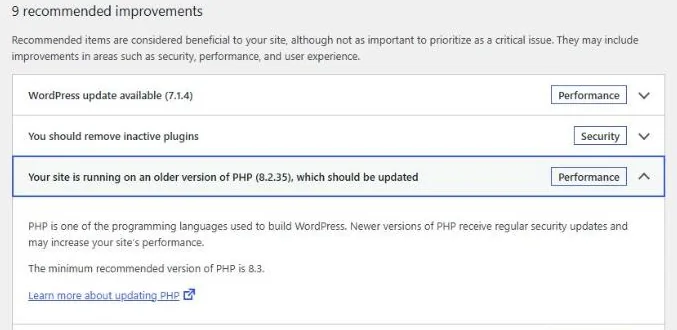
So an old PHP version does not only miss PHP fixes. It slowly locks your plugins out of their own security updates too. WordPress itself also nudges you: its Site Health screen flags PHP 8.2 and recommends 8.3 as the minimum.
For new sites, WordPress's hosting handbook for 7.0 recommends PHP 8.4 or 8.5, and WordPress 7.0 dropped support for PHP 7.2 and 7.3 entirely.
How to check your PHP version
On a WordPress site this takes about a minute:
- Log in to WordPress and go to Tools › Site Health.
- Look at the Status tab. If PHP is out of date, you will see "Your site is running on an older version of PHP" in the list of recommended improvements.
- For the exact number, open the Info tab and expand Server. The "PHP version" line shows what you are running.
- Not on WordPress? Check your hosting control panel (often under "PHP version" or "MultiPHP Manager"), or ask your host or developer.
On Shopify, Wix, Webflow, Framer or Squarespace? You don't need to do anything. Those platforms run and update their own servers. This only applies to sites on hosting you or your developer manage, such as WordPress, WooCommerce, Laravel or custom PHP sites.
How we move a site to a newer PHP version
Changing PHP is usually a single setting in the hosting panel. Doing it safely is a bit more than that. This is our routine:
- Check the current version and what depends on it. We list the theme, page builder and plugins, and check each one supports the target version. Plugins that have not been updated in years get a closer look, because those are the ones most likely to fail.
- Update WordPress, plugins and the theme first, as far as the current PHP allows. Newer plugin versions usually support newer PHP. Our post on updating WordPress safely covers how we do this part.
- Take a full backup, files and database, before changing anything.
- Test the new PHP version on a staging copy for larger sites and stores, and watch the error log for warnings.
- Fix or replace what breaks. Usually that means updating an old plugin, replacing an abandoned one, or fixing custom code in the theme.
- Switch the live site to the new version, then check forms, checkout, logins and the pages that bring in enquiries.
- Keep a way back. Most panels let you switch the PHP version back in seconds, and the backup is there if needed.
For most sites today, PHP 8.4 is the sensible target. It is supported until the end of 2028 and works with current WordPress and the plugins most business sites use. Very old sites may need a stop at 8.3 first.
What if your host can't offer PHP 8.3 or newer?
Then it is time to move hosts. A host that still can't offer supported PHP versions at the end of 2026 is unlikely to be keeping the rest of its servers up to date either. If your old developer controls the hosting account, start with our developer handover checklist. If you are in India, we wrote about hosting alternatives after SiteGround left India.
We can also take the whole problem off your hands. Our website migration service moves your site, email and domain to a better host with as little downtime as possible. Hosting with us includes maintenance for life, and our maintenance plans start from $10 a month (₹1,500 in India) if you want to stay where you are.
Send us your site address and we will check which PHP version it runs and what an upgrade would involve.
Questions we get asked
Will my website stop working on 1 January 2027?
No. A site on PHP 8.2 keeps running after 31 December 2026. The difference is that newly found security holes in PHP 8.2 will no longer be fixed, and more plugins will stop offering updates for it.
Do Shopify, Wix, Webflow or Framer sites need a PHP update?
No. Those platforms manage their own servers. PHP versions only matter for sites on hosting you or your developer manage, such as WordPress, WooCommerce and custom PHP sites.
Which PHP version should my WordPress site use?
WordPress recommends PHP 8.3 as the minimum and suggests 8.4 or 8.5 for new sites. For most existing business sites, 8.4 is a sensible target once the theme and plugins are confirmed to support it.
Can changing the PHP version break my site?
It can, usually because an old plugin or custom theme code doesn't support the newer version. That is why we update plugins first, take a backup, test larger sites on a staging copy, and keep the option to switch back.
Does updating WordPress also update PHP?
No. PHP runs on the server, separately from WordPress. Your host or developer changes it, usually with a setting in the hosting control panel.


