
Switching Web Developers? How to Move Your Website Without Losing Your Domain, Email or Rankings

People change web developers for all kinds of reasons. The old developer stopped replying. The agency closed. Prices went up, or the site simply needs more than the current person can do. Whatever the reason, the worry is the same: "If I leave, will I lose my website, my email or my Google rankings?"
You won't, as long as you take control of a few key accounts before anything moves. Most of the sites we look after were built by someone else, so we go through this handover all the time. This is the checklist we use, in the order we use it.
Key takeaways
- Your domain is the one thing you must control. Make sure the registration is in your name before you switch.
- Copy your email (MX) and DNS records before any change, so email keeps arriving.
- Add yourself as an owner on every account first, then remove the old developer's access.
- If the URLs stay the same, Google barely notices a new developer. If they change, 301 redirects carry your rankings over.
- Switching developers does not mean switching hosting or rebuilding the site. Those are separate decisions.
In this post
Step 1: List what you own and where it lives
Before you say anything to your current developer, write down every account your website depends on. Most problems we see come from an account nobody remembered: the domain registered on the developer's personal login, or analytics on their agency account.
| Account | Usually lives at | What you need |
|---|---|---|
| Domain name | A registrar (where the domain was bought) | Your own login, with you as the registrant |
| DNS | The registrar, the host, or a service like Cloudflare | Owner access, or a full export of the records |
| Hosting | Your host, or the developer's reseller account | Your own account, or a full backup |
| Google Workspace, Microsoft 365, Zoho, or the host | Admin access to the email account | |
| Website admin | WordPress, Shopify, Webflow, Wix, Framer | An administrator or owner login in your name |
| Google accounts | Search Console, Analytics (GA4), Tag Manager, Business Profile | Owner access for your own Google account |
| Paid licences | Theme, page builder (like Elementor Pro), premium plugins | Licence keys, and whose card pays the renewal |
| Code and backups | GitHub or similar, backup storage | Access to the repository and the latest backup |
Step 2: Get control of your domain
If you only do one thing on this list, do this. Whoever controls the domain controls your website address and your email.
- Check who the registrant is. The domain should be registered in your name or your company's name, with an email address you control.
- Get your own login at the registrar, or have the domain pushed into an account you own.
- Know the transfer rules. Under ICANN's rules, changing the registrant's name, organisation or email can lock the domain against transfers for 60 days, and a registrar may refuse a transfer within 60 days of a new registration or a previous transfer. Plan around that.
- Ask for the transfer code if you are moving registrars. ICANN says your registrar must provide the code within five calendar days of your request.
When we move a domain for a client, we unlock it at the current registrar, get the transfer code, copy the DNS records, and then need the client for a checkout that takes about five minutes. Our part is done within a day. The registry then takes 2 to 5 business days to finish, and the website stays online the whole time. More detail is on our domain registration page.
Step 3: Protect your email and DNS
Email breaking is the most common surprise in a developer switch, and it is almost always avoidable. Your email depends on DNS records, not on the website. If someone changes the DNS without copying those records, mail stops arriving.
- Export or screenshot every DNS record before any change: A, CNAME, MX, TXT and anything else.
- Pay special attention to MX, SPF, DKIM and DMARC. MX records decide where email goes. The others stop your emails landing in spam.
- Recreate them exactly at the new DNS provider before switching the nameservers.
- Send test emails both ways after the switch, from and to an outside address like Gmail.
If your mailboxes are hosted on the old developer's server, that is a separate move. Our business email service sets up Google Workspace, Microsoft 365 or Zoho Mail and migrates existing mailboxes.
Step 4: Add yourself first, then remove the old developer
The order matters. Add your own owner or administrator access to every account, confirm it works, and only then remove the old developer. Removing access first can lock everyone out.
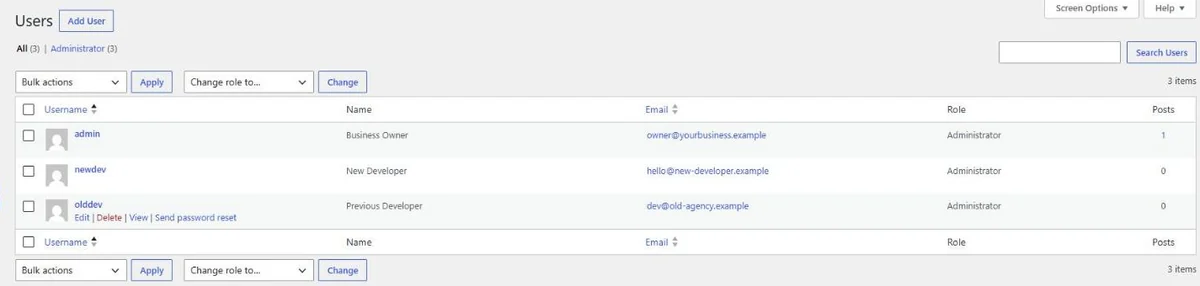
For a WordPress site, that means:
- Create your own administrator account and log in with it.
- Change the Administration Email Address under Settings › General to an address you control. WordPress sends a confirmation email to the new address, and the change only applies once it is confirmed.
- Delete or downgrade the old developer's user and assign their content to you.
- Remove application passwords and any security or backup plugin connections tied to their accounts.
- Change the hosting, SFTP and database passwords.
Do the same in Google Search Console, Google Analytics, Tag Manager and your Google Business Profile: add your own Google account as an owner, then remove theirs.
Notes for Shopify, Webflow and other platforms
The idea is the same on every platform, but a few 2026 changes are worth knowing about:
- Shopify: make sure you are the store owner, not a staff account, and remove the old developer's staff or collaborator access. If they ever added tracking code to the order "Additional scripts" box, check it. Shopify made that box view-only in August 2025, and non-Plus stores had to upgrade their Thank you and Order status pages by 26 August 2026. Old tracking there has to be rebuilt with app pixels.
- Webflow: sites often sit in the developer's Freelancer or Agency Workspace. Webflow's new plans apply to existing sites in those workspaces at the next renewal or billable change on or after 16 November 2026, so a handover is a good moment to move the site into a workspace you own and check what you will pay.
- Wix and Framer: ask the developer to transfer site ownership to your account, or to add you as an owner, before they leave.
- Custom code (Next.js, Laravel and so on): make sure you get the code repository and know where the site is deployed, not just a login to the live site.
If the site is changing hosts too
Switching developers doesn't force a hosting move, but many people do both at once, especially when the old developer was also the host. When we move a site to new hosting, we work in this order:
- Inventory and URL map. Every page, image, form and URL is listed, so nothing quietly disappears.
- Move to staging. The site is copied to a private staging copy on the new host while the current site stays live.
- Check side by side. Old and new are compared page by page: redirects, titles, descriptions, forms and email.
- Switch over. DNS is switched with as little downtime as possible, and the old site stays in place until the new one is confirmed working.
For online stores, we sync the database at the moment of the switch, so orders and customer accounts placed during the move aren't lost. Our website migration page has the full details.
Taking over an older WordPress site often means an old PHP version and months of skipped updates. Our posts on PHP 8.2 reaching end of life and updating WordPress safely cover what we check next.
Keep your Google rankings
Google ranks pages, not developers. If your domain and URLs stay the same, a new developer makes no difference to Google at all. Rankings only get hurt when URLs change without redirects, or pages disappear.
- Keep URLs the same where you can.
- If URLs change, add 301 redirects from every old URL to its new page, and keep titles and descriptions.
- Get owner access to Search Console, then resubmit the sitemap after any move.
- Watch the Page indexing report for a few weeks. "Page with redirect" for old URLs is normal and what you want.
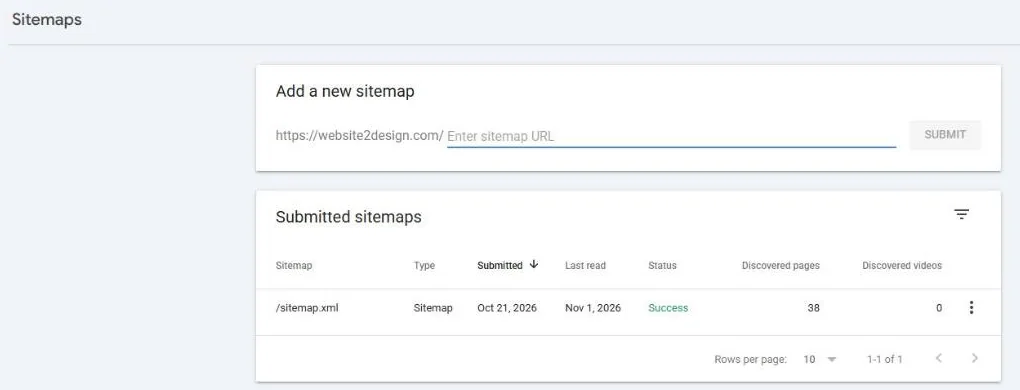
We followed the same rules for our own site. When we moved website2design.com from WordPress to a new build in October 2026, we listed every old URL we could find, 133 of them from old sitemaps, Search Console and redirect rules, and checked that each one ended on a working page before launch. If you want someone to watch rankings during and after a move, that is part of our SEO service.
If the old developer won't hand over access
Most handovers are friendly. When they aren't, stay calm and work through it in this order:
- Ask in writing, with a clear list of what you need and a reasonable deadline.
- Start with the domain. If you can prove the business owns it, the registrar's support team can explain how to get access. Ownership disputes go through the registrar's own process.
- Check what you already have. An old admin login, a hosting invoice in your name, or the Google account that pays for email can all be starting points.
- Rebuild only as a last resort. Content can be recovered from the live site if needed, but it is slower and costs more than a proper handover.
For future projects: whoever builds your next site, make sure the domain, hosting and Google accounts are in your name from day one. With us, the client owns the site and can take it to another host whenever they want.
How we help with the switch
We take over sites built by other developers on WordPress, Shopify, Webflow, Wix, Framer and custom code. A typical handover with us looks like this: we collect access, take a full backup before touching anything, check the site properly, and fix anything outstanding before regular maintenance starts. If the site needs to move, migrations start from $50 for one simple website (₹3,000 in India), and every job gets a fixed quote first.
Tell us about your site and who manages it today, and we will tell you exactly what we need from your current developer.
Questions we get asked
Will my website go down when I switch developers?
Not if the handover is planned. Changing who manages the site does not touch the live website. Downtime only becomes a risk if the hosting or DNS moves too, and even then it can be kept to a minimum by copying all DNS records first and keeping the old site in place until the new one is confirmed working.
Do I need my old developer's permission to move my domain?
If the domain is registered in your name and you have the registrar login, no. You can unlock it and request the transfer code yourself. If the domain is in the developer's account or name, you need them, or the registrar's support process, to move it to you.
Will I lose my Google rankings if I change developers?
No. Google ranks pages, not developers. As long as your domain and URLs stay the same, or old URLs are 301 redirected to their new pages, your rankings carry over.
What if my old developer doesn't respond at all?
Start with the accounts you can prove are yours, especially the domain, through the registrar's support team. Check old emails for hosting invoices and logins. If nothing else works, the content can be recovered from the live site and rebuilt, though that takes longer than a proper handover.
Can you take over a site built on Wix, Webflow or Shopify?
Yes. We take over sites on WordPress, Shopify, Webflow, Wix, Framer and custom code. On hosted platforms, the main step is transferring site or store ownership to your own account, then adding us as a collaborator.


